ILAP Analytics is delivered as a set of deployment artifacts through the IDE Installation Center, and new versions are released there over time. This page explains how to download the artifacts and installation guide, check for updates to an existing installation, and decide when an infrastructure (Bicep) deployment is required. It is written for the IT administrator who installs and keeps an ILAP Analytics environment up to date.
Getting the deployment artifacts
Prerequisite
- The organization should have a registered tenant in IDE platform.
- The user to download the artifacts should have tenant admin permission on IDE for the tenant.
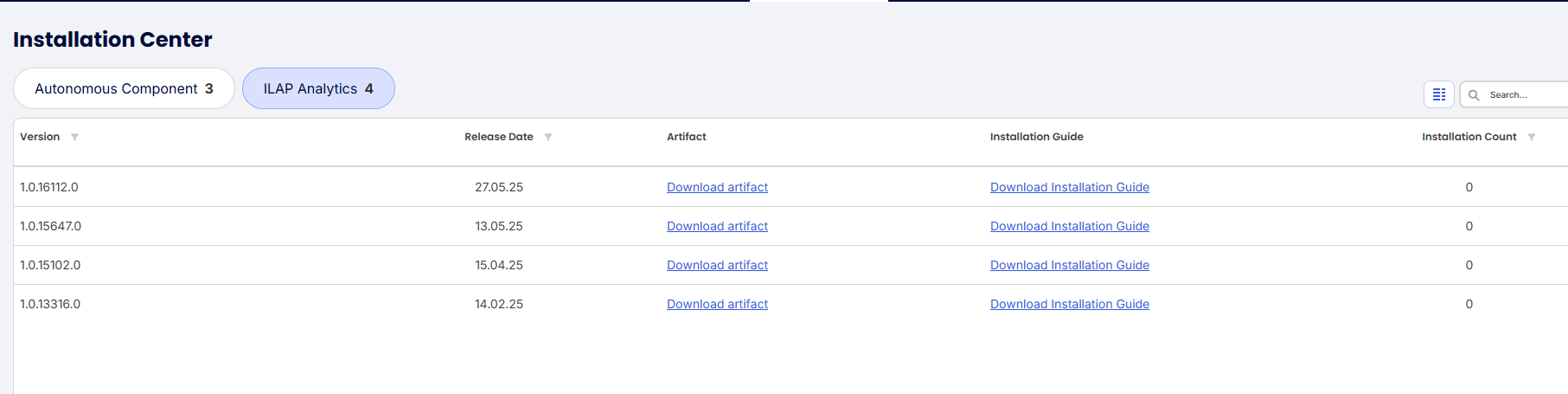
Download artifacts from installation Center
- Go to IDE web.
- Click Tenant Admin → installation center
- Click on the Ilap Analytics Tab
- Download the latest artifact and the installation guide.
Check for update for existing installation
If you have already installed the IA in you organization, you can check if there is any new update by going to the clients-> Ilap Analytics page. If there is an update available, a icon will be shown beside the backdated instance like the screenshot below

Installation Guide
In the screenshot above, you can also see a link to the installation guide. This guide contains the release note, and detailed procedure on how to deploy the artifacts.
IA-documentation
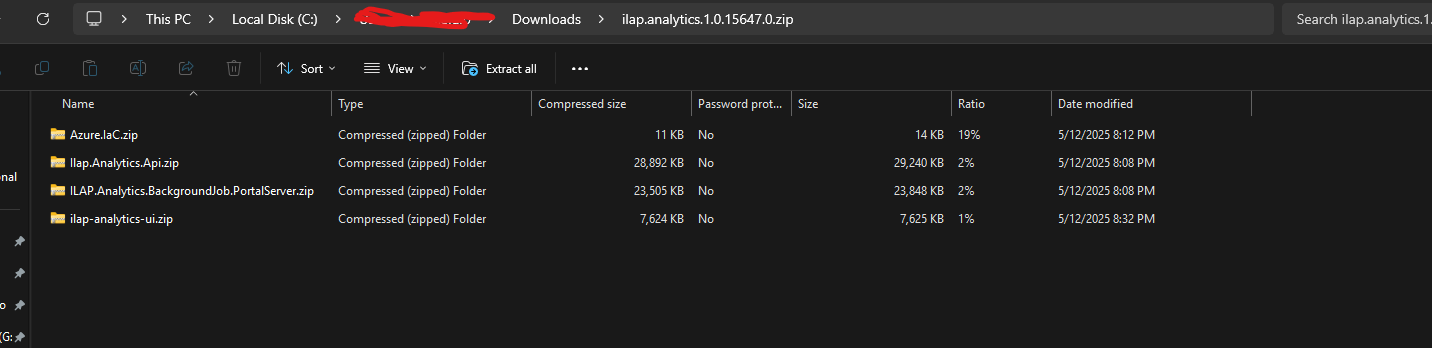
Now that you have the Azure artifact, it’s most likely is going to be a single zip file. After unzipping the zip file, you’ll get 4 more zip files like the screenshot below
For New Customers
New customer’s should go through the document New Customer
Deploying the Bicep Azure resources
The unzipped content of the zip file Azure.IaC will enable you to deploy the azure resources. Follow these 2 documents on how to deploy the resources in Azure
Deploying applications in the Azure resources
Follow the document Install IlapAnalytics
Skipping Azure resource deployment
This section is not applicable for new user. You if want to skip the azure resource deployment for a release, you need to make sure 2 things.
- On the release note(Found on the installation guide) of the deployment, there is no specific request for mandatory IaC deployment.
- If you have skipped any deployment in between (Suppose you have version x installed now and you want to deploy version x+4), make sure IaC deployment is not mandatory in any of the installation guide in between (bicep deployment is not mandatory for version x, x+1...x+4)
Was this article helpful?
That’s Great!
Thank you for your feedback
Sorry! We couldn't be helpful
Thank you for your feedback
Feedback sent
We appreciate your effort and will try to fix the article