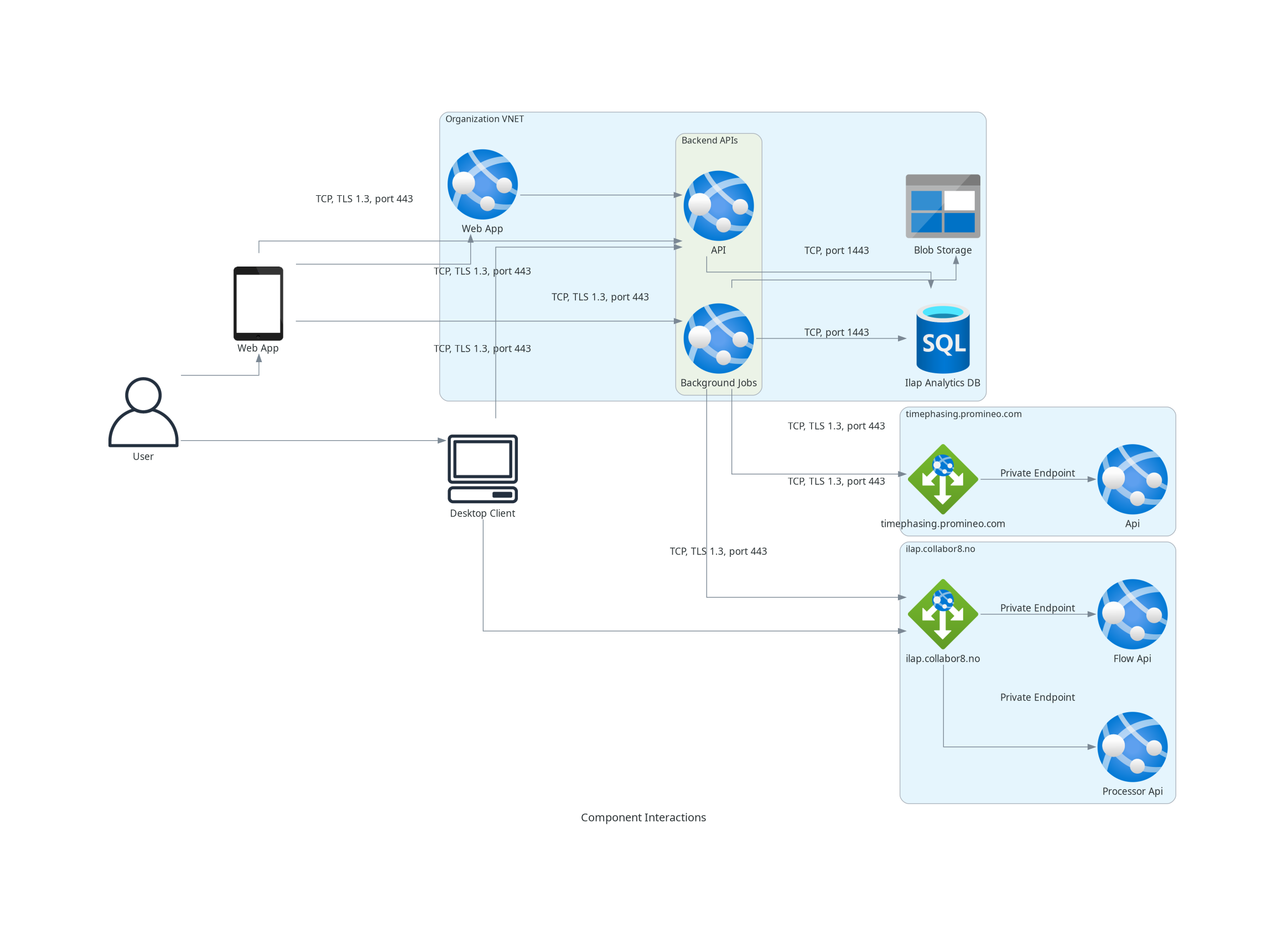
- The user can use both the desktop client and the Analytics single page application.
- Both the desktop client and the analytics ui should be within the organization VNET or should have access to the organization VNET.
- The desktop client interacts with the processor api and the ILAP data exchange (IDE) API as part of IDE communication.
- The desktop app interacts with the analytics api.
- The analytics api interacts with the IDE (during startup) to fetch the ILAP terms.
- The analytics api doesn’t directly interact with the background job. It inserts records int othe hangfire database.
- The background job interacts with the IDE API to fetch ILAP terms.
- The background job interacts with the blob storage to save the ilap file
- Both the analytics API and the background job interacts with the sql server time to time.
Inbound and out bound ports
- TCP 443 for all the https calls.
- TCP 1443 for database interaction.
- UDP/TCP 53 for Azure DNS
Inbound & Outbound IP whitelisting
Inbound calls
- Make sure the desktop app user and the Autonomous component’s IP addresses are whitelisted.
- The single page application user’s IP address needs to be whitelisted as well.
Outbound calls
Azure resources
The apps calls various azure resources. We need to make sure these calls are not restricted by any network access policies. The resources are
- SQL Database
- Azure Blob Storage
IDE API
The probable URL’s of the IDE API is give below
| Environment | Url |
|---|---|
| Test Environment | https://ilaptest.collabor8.no/api/api |
| Production Environment | https://ilap.collabor8.no/api/api |
The analytics api calls the IDE api to validate it’s version while performing export/import. The request looks like below
curl -X 'GET' \ 'https://localhost:7138/api/ClientValidations/Validate/IlapAnalytics?version=0.1.0.0' \ -H 'accept: text/plain' \ -H 'Authorization: Bearer eyJhbGciOiJIUzI1...removed.for.brewity'
The response is like below
{
   "version": "0.1.0.0",
   "isValid": true,
   "message": ""
}
The background job and the API calls the IDE api to synchronize metadata fields. We need to make sure these calls goes through. The request is given below
curl -X 'POST' \\
  '<https: //localhost:7138/api/Fields/ByIlapIds>' \\
  -H 'accept: text/plain' \\
  -H 'Authorization: Bearer eyJhbGciOiJIUzI1...removed.for.brewity'
  -H 'Content-Type: application/json-patch+json' \\
  -d '{
    "ilapIds": [
        "R-B41D5908-0D3A-4A66-9AC1-959C11CD4DAD"
    ]
}'
The response is given below
[
    {
        "planningObjectTypes": 1,
        "name": "OG_Proj_ContractId",
        "description": "The contract Id or Purchase Order that the schedule relates to.",
        "uri": "R-09e2dc67-5163-44d3-8472-306bf1c4c8dd",
        "ilapId": "R-B41D5908-0D3A-4A66-9AC1-959C11CD4DAD",
        "dataType": 5
    }
]
Timephasing API
The URL of the timephasing service is: https://timephasing.promineo.com/
The background job and the API calls the timephasing api to periodize activities. Sample request
{
    "FieldMappings": {
        "ActivityKeyField": "Id",
        "StartDateField": "S",
        "FinishDateField": "F",
        "CalendarKeyField": "C",
        "ProfileKeyField": "P",
        "ValueField": {
            "Field": "V",
            "Type": 1
        }
    },
    "Calendars": [],
    "Profiles": [],
    "Outputs": [
        {
            "Title": "TimephasedActivities",
            "RangeLimit": {
                "Start": "0001-01-01T00:00:00Z",
                "Finish": "0001-01-01T00:00:00Z"
            },
            "GroupBy": [
                {
                    "Title": "I",
                    "Field": "I"
                }
            ],
            "PointsInTime": {
                "Type": 5,
                "Title": "P",
                "CustomPointsInTime": [],
                "FirstDayOfWeek": 0,
                "CalendarWeekRule": 0,
                "CRONExpression": "0 0 0 ? * SUN *"
            },
            "Values": [
                {
                    "Title": "V",
                    "Type": 1
                }
            ]
        }
    ],
    "PreProcessor": null,
    "Activities": [
        {
            "Id": "1",
            "I": "1",
            "C": null,
            "P": null,
            "S": "2025-06-12T14:21:19.5021348Z",
            "F": "2025-06-12T14:21:19.5021359Z",
            "V": 10.0
        }
    ]
}
Sample Response
{
    "timephaseData": {
        "TimephasedActivities": [
            {
                "I": "1",
                "P": "2025-06-15T23:59:59",
                "V": 10.0
            }
        ]
    },
    "statusCode": 200,
    "message": "OK"
}
Was this article helpful?
That’s Great!
Thank you for your feedback
Sorry! We couldn't be helpful
Thank you for your feedback
Feedback sent
We appreciate your effort and will try to fix the article