On release 2.3.x.0 we introduced sending message after completion of import/revert events under the card #5679. In order to enable sending message to event hub, we need to take a look at the following part of the bicep param file
// Operation completion notifications
// Controls whether applications publish a notification to event hub when a report schedule import/revert is completed.
// Notes:
// - If you plan to enable this, configure the "eventhubConfig" block below.
// - If you plan to notify via HTTP callback, set "CallbackHostUrl" to your API host base URL.
param operationCompletionNotificationConfig = {
  // Enable or disable operation completion notifications (true|false)
  IsEnabled: false
  // Notification type:
  //      1 = Report Schedule Id Only,
  //      2 = Report Schedule Id With Activity Ids,
  //      3 = Report Schedule Ids With Activity Fqdns
  NotificationType: 2
  // Optional: Base URL for callback endpoints (used when notification type 3 is selected)
  CallbackHostUrl: publicConfigurations.analyticsApiUrl

  // Number of notifications to send in a single batch
  /*
    | Event hub pricing tier | Basic  | Standard | Premium | Dedicated |
    |------------------------|--------|----------|---------|-----------|
    | Batch size to use      | ~2000  | ~6000    | ~6000   | ~150000   |
  */
  BatchSize: 2000
}

// Event Hub configuration (optional, mandatory if operation completion notifications are enabled above)
// Provide only if you plan to publish operation completion notifications to an Azure Event Hub.
// - NamespaceUrl: The fully qualified namespace host (e.g., "your-namespace.servicebus.windows.net").
// - EventhubName: The Event Hub name to which events will be emitted.
// Note: Ensure that the application has the necessary permissions to send events to the specified Event Hub.
param eventhubConfig = {
  NamespaceUrl: //'your-namespace.servicebus.windows.net'
  EventhubName: //'name-of-your-eventhub'
}
If you don't want the event hub message sending to be enabled, just delete this portion from bicep param file and deploy the IaC. If you plan to enable event hub message sending, you need to make the following changes in the operationCompletionNotificationConfig
- Set
IsEnabledto true - Set appropriate
NotificationType.
Also you need to set the event hub config.
Setting the namespace url
- Go to your Event hub namespace in azure.
- copy the name of the event hub as shown in the screenshot
- the namespaceUrl would be
{NameOfTheEventHub}..servicebus.windows.net(in our case, itsEventhubAnalyticsDev.servicebus.windows.net)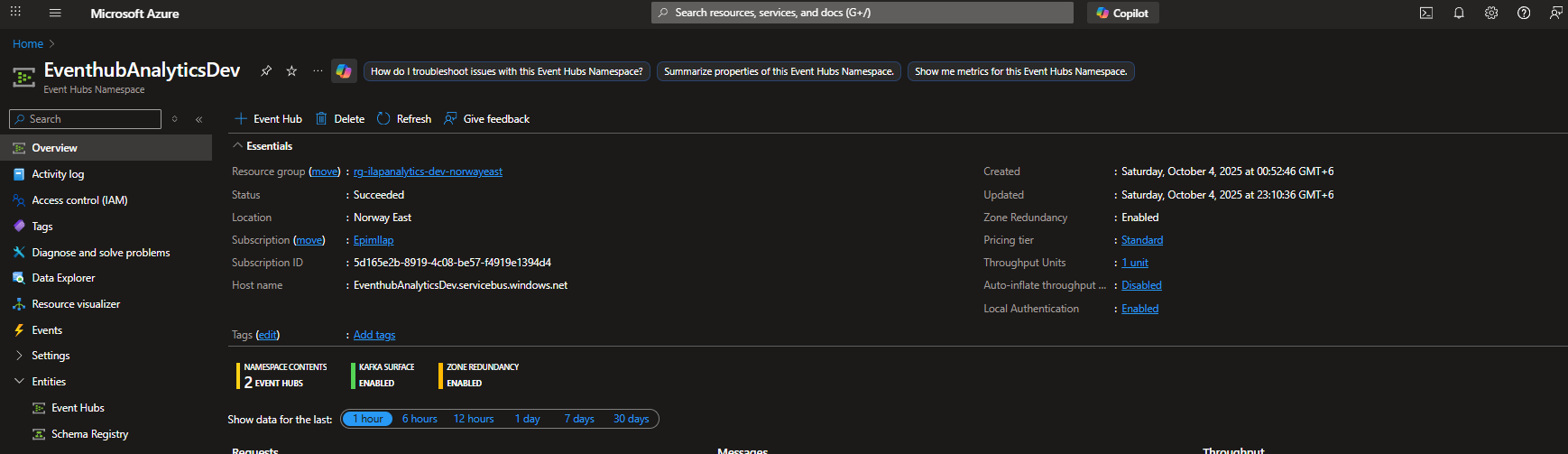
Setting the Eventhub name
- Put the name of the event hub where you want to send messages to.
Setting the permission
You have to manually give the background job permission to send data to event hub. giving the permission Azure Event Hubs Data Sender is enough.

Was this article helpful?
That’s Great!
Thank you for your feedback
Sorry! We couldn't be helpful
Thank you for your feedback
Feedback sent
We appreciate your effort and will try to fix the article